Rahul
 LeetCode #155: Min Stack — Design a Stack with O(1) Minimum Retrieval
 LeetCode #20: Valid Parentheses — Master the Stack Pattern
 LeetCode #15: 3Sum — Master Sorting, Two Pointers and Duplicate Handling
 Instruction vs Context in AI Prompts: How to Tell AI What to Do and What Information to Use
 Rust Structs and Enums: Building Powerful Data Models
 Dissecting the High-Level System Architecture of Booking.com
 Kanban vs. Scrum: Which Agile Methodology to Choose?
 The Scaling Journey of LinkedIn: From Startup to Professional Powerhouse
 Mastering Code Review: A Guide for Reviewers and PR Creators
 ChatGPT: Unveiling the Power of AI in Conversational Experiences with Kairos Coders

Kairos Coders are here to help
In the previous article, we learned about vertical and horizontal scaling.
We saw that instead of running an application on a single server:
Users
  ↓
Server
we can run multiple servers:
              ┌── Server 1
              │
Users → ??? ──┼── Server 2
              │
              └── Server 3
But there's an obvious question:
Who decides which server receives each request?
That's where a Load Balancer comes in.
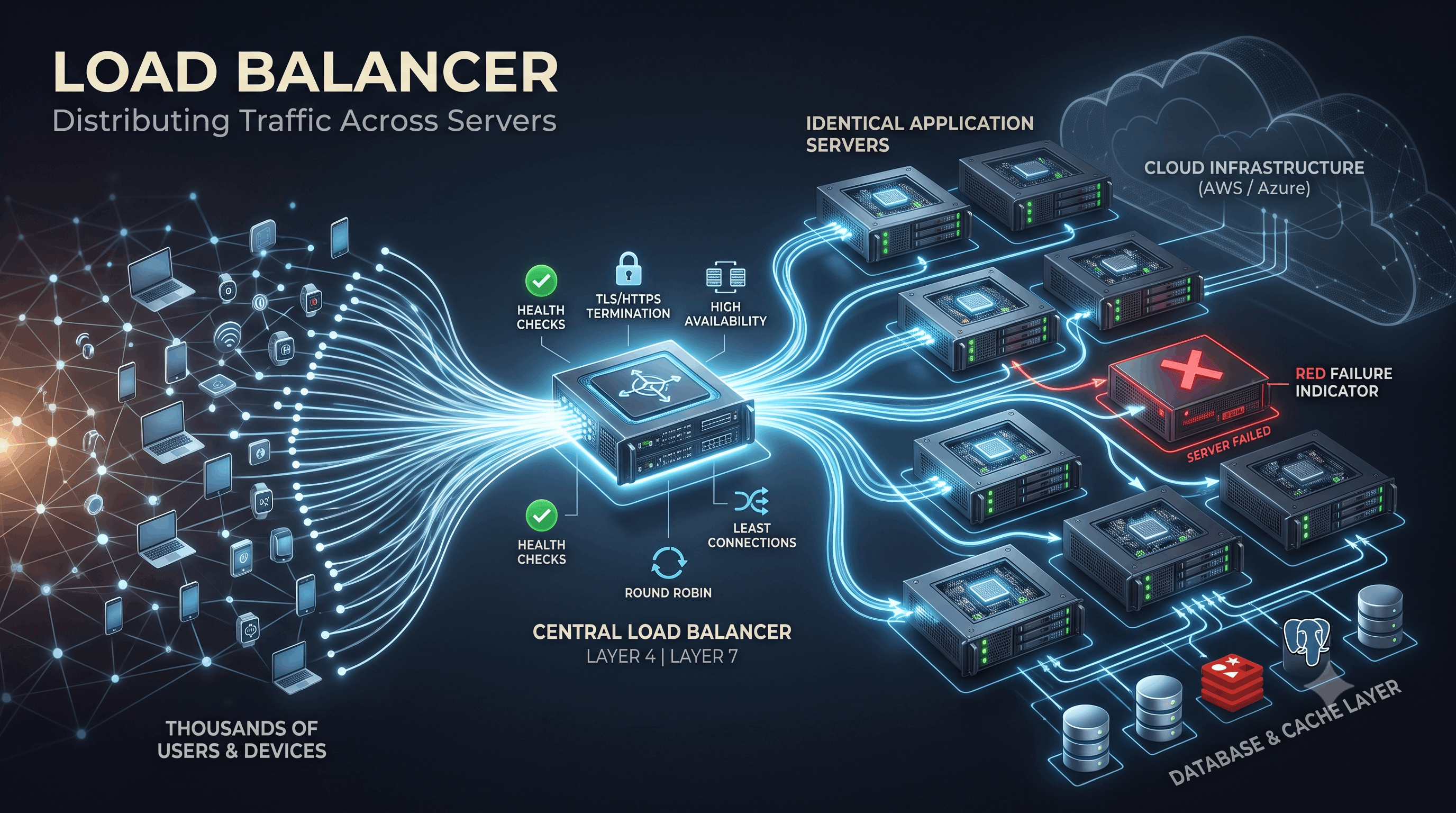
A load balancer sits between clients and backend servers and distributes incoming traffic across available servers.
A simplified architecture looks like:
                    ┌── Application Server 1
                    │
Users → Load Balancer ── Application Server 2
                    │
                    └── Application Server 3
This simple component plays a huge role in building systems that are:
Let's understand how load balancing works from the ground up.
A load balancer is a system that distributes incoming network requests across multiple backend servers.
Suppose you have three application servers:
Server A
Server B
Server C
Instead of clients directly choosing a server, they communicate with the load balancer:
Client
  ↓
Load Balancer
  ↓
Server A / B / C
The load balancer determines where the request should go.
Without a load balancer, clients might need to communicate directly with individual servers.
User 1 → Server A
User 2 → Server A
User 3 → Server B
User 4 → Server C
This creates several problems.
What if Server A receives too much traffic?
What if Server B crashes?
What if you add Server D?
How does the client know about the new server?
A load balancer solves these problems by providing a single entry point.
                    ┌── Server A
                    │
Users → Load Balancer ── Server B
                    │
└── Server CA load balancer can perform several important tasks.
Distribute requests across servers.
Determine whether servers are healthy.
Avoid sending requests to failed servers.
In some architectures, handle encrypted connections at the load balancer.
Send requests to different backend services based on rules.
Prevent one server failure from taking down the entire application.
Suppose your application receives:
3,000 requests/secondand you have three servers.
Each server can theoretically handle:
1,000 requests/secondThe load balancer can distribute traffic approximately like:
3,000 requests/sec
        ↓
   Load Balancer
        │
   ┌────┼────┐
   ↓    ↓    ↓
 1000 1000 1000
   ↓    ↓    ↓
  S1   S2   S3
The exact distribution depends on the algorithm and workload.
A common misconception is:
"A load balancer simply sends the same number of requests to every server."
Not necessarily.
Imagine:
Server A → 8 CPU cores
Server B → 4 CPU cores
Server C → 2 CPU cores
Treating them identically may not be optimal.
Load balancers can use different algorithms to make better routing decisions.
Let's examine the most important ones.
Round Robin is one of the simplest strategies.
Requests are distributed sequentially.
Suppose we have:
Server A
Server B
Server C
Requests might be distributed as:
Request 1 → A
Request 2 → B
Request 3 → C
Request 4 → A
Request 5 → B
Request 6 → C
Conceptually:
A → B → C → A → B → CIt assumes servers can handle approximately similar workloads.
That's not always true.
One request might be extremely expensive while another is trivial.
Weighted Round Robin assigns different weights to servers.
Suppose:
Server A → Weight 5
Server B → Weight 3
Server C → Weight 2
The load balancer sends more traffic to Server A.
Conceptually:
A A A A A
B B B
C C
This is useful when servers have different capacities.
Instead of counting requests, the load balancer considers the number of active connections.
Suppose:
Server A → 20 connections
Server B → 5 connections
Server C → 12 connections
A new request may be sent to:
Server Bbecause it currently has the fewest active connections.
This can be useful when requests have significantly different processing times.
This combines:
For example:
Server A → Powerful
Server B → Medium
Server C → Small
The load balancer can take both capacity and current workload into account.
The load balancer can calculate a hash based on the client's IP address.
Conceptually:
Hash(client IP)
       ↓
Server selection
This can cause the same client to consistently reach the same backend server.
This can be useful for certain stateful applications, although relying on client IP for affinity has limitations.
Consistent hashing is particularly important in distributed systems.
Instead of simply mapping clients to servers, we can map keys onto a hash ring.
             Server A
                ●
          ┌─────────────┐
       ●                 ●
 Server C               Server B
          └─────────────┘
When servers are added or removed, consistent hashing can minimize how many keys need to move.
We'll dedicate an entire article to consistent hashing later because it becomes extremely important for:
Imagine you have:
Server A ✓
Server B ✓
Server C ✓
Then Server B crashes:
Server A ✓
Server B ❌
Server C ✓
If the load balancer continues sending requests to Server B:
Users
  ↓
Load Balancer
  ↓
Server B ❌
users may receive errors.
That's why load balancers commonly perform health checks.
The load balancer periodically sends a request to a health endpoint.
For example:
GET /healthA healthy server might return:
200 OKThe load balancer interprets this as:
Healthy ✓If the server stops responding correctly:
Timeout
500
Connection refused
the load balancer may mark it unhealthy:
Server B ❌and stop routing traffic there.
Health checking can be implemented in different ways.
The load balancer actively sends requests.
Load Balancer
      ↓
GET /health
      ↓
ServerThe load balancer observes failures from normal traffic.
For example:
Requests → Server
           ↓
Repeated failures
           ↓
Mark server unhealthy
Systems can use one or both approaches.
A simple endpoint might only verify:
Application process is runningBut that's not necessarily enough.
Imagine:
Application ✓
Database ❌
The application process is alive but can't perform useful work.
A deeper health check might verify critical dependencies.
However, making health checks too dependent on downstream services can also cause problems.
This is why real systems often distinguish between different kinds of health signals, such as:
We'll revisit this when discussing fault tolerance and orchestration.
Suppose we have:
                 ┌── Server A ✓
                 │
Users → LB ──────┼── Server B ✓
                 │
                 └── Server C ✓
Server B fails:
                 ┌── Server A ✓
                 │
Users → LB ──────┼── Server B ❌
                 │
                 └── Server C ✓
The load balancer removes Server B from the active pool.
Traffic continues through:
Server A
Server C
This is one reason redundancy is so valuable.
Now we encounter a classic System Design problem.
Users
  ↓
Load Balancer ❌
  ↓
Servers
The load balancer itself has become a:
Single Point of Failure.
A production architecture therefore often needs redundancy at the load-balancing layer too.
For example:
                 ┌── Load Balancer 1
Users → Routing ─┤
                 └── Load Balancer 2
                       │
                ┌──────┼──────┐
                ▼      ▼      ▼
               S1     S2     S3
The exact implementation depends on the infrastructure.
One of the most important concepts in load balancing is the difference between:
These refer to layers of the networking model.
Layer 4 operates primarily at the transport layer.
It works with information such as:
Conceptually:
Client
  ↓
L4 Load Balancer
  ↓
Backend Server
The load balancer doesn't need to understand the full HTTP request.
This can make L4 load balancing efficient for many workloads.
Layer 7 operates at the application layer.
It can understand protocols such as HTTP/HTTPS.
That means it can make routing decisions based on things such as:
Host
Path
Headers
Cookies
HTTP method
For example:
/api/userscould go to:
User Servicewhile:
/api/ordersgoes to:
Order ServiceArchitecture:
                         ┌── User Service
                         │
Client → L7 Load Balancer ── Order Service
                         │
└── Product ServiceA Layer 7 load balancer can route traffic based on URL paths.
For example:
/api/users/*
       ↓
User Service
/api/orders/*
↓
Order Service/api/products/*
↓
Product ServiceThis becomes extremely useful in microservice architectures.
Traffic can also be routed according to the hostname.
For example:
users.example.com
        ↓
User Service
payments.example.com
↓
Payment Serviceapi.example.com
↓
API InfrastructureThis provides flexible routing at the application layer.
These concepts are related but not identical.
A reverse proxy sits between clients and backend servers.
Client
  ↓
Reverse Proxy
  ↓
Backend
A reverse proxy can provide:
A load balancer specifically focuses on distributing traffic across backend instances.
Many modern products can perform both roles.
For example, an infrastructure component may act as:
Reverse Proxy
       +
Load BalancerA popular example is Nginx.
It can operate as a reverse proxy and distribute traffic between backend servers.
Conceptually:
Internet
   ↓
Nginx
   ↓
┌──────┬──────┬──────┐
App 1  App 2  App 3
For a small deployment, this can be a straightforward architecture.
At larger scales, managed and cloud-native load-balancing solutions are also common.
HTTPS traffic is encrypted.
The load balancer can sometimes terminate TLS connections.
Instead of:
Client
  ↓ HTTPS
Application
you can have:
Client
  ↓ HTTPS
Load Balancer
  ↓ HTTP/HTTPS
Application
The load balancer decrypts the request and forwards it to the backend.
This is called TLS termination.
Depending on security requirements, encryption may also continue from the load balancer to backend services.
One benefit is centralization.
Instead of configuring certificates independently on every application server:
Server A → Certificate
Server B → Certificate
Server C → Certificate
you can manage TLS at the edge/load-balancing layer.
This can simplify certificate management.
However, internal encryption requirements must be considered carefully.
Remember the state problem from our previous article?
Suppose:
User
  ↓
Server A
and Server A stores the session locally.
If the next request goes to Server B:
User
  ↓
Server B
the session may not exist there.
One possible solution is session affinity, commonly called sticky sessions.
The load balancer attempts to keep a user connected to the same backend.
User A → Server A
User A → Server A
User A → Server A
This can simplify certain stateful applications.
But sticky sessions also have disadvantages.
Suppose:
Server A → 10,000 users
Server B → 2,000 users
Traffic may become uneven.
Also, if Server A fails:
Server A ❌those users may need to establish sessions elsewhere.
A more scalable design is often to externalize session state:
Server A ──┐
Server B ──┼── Shared Session Store
Server C ──┘
This allows requests to move between servers.
Load balancers work particularly well with auto-scaling systems.
Suppose traffic increases:
5 serversbecomes:
10 serversThe new servers can be added to the load balancer's backend pool.
Traffic then gets distributed across the larger fleet.
When traffic falls:
10 servers
   ↓
5 servers
instances can be removed.
The load balancer helps abstract these infrastructure changes from clients.
Let's combine the concepts.
                         Internet
                            │
                            ▼
                           DNS
                            │
                            ▼
                           CDN
                            │
                            ▼
                    Load Balancer
                            │
             ┌──────────────┼──────────────┐
             ▼              ▼              ▼
          App Server     App Server     App Server
             │              │              │
             └──────────────┼──────────────┘
                            │
                            ▼
                          Cache
                            │
                            ▼
                         Database
This architecture can scale significantly better than:
Internet
   ↓
One Server
   ↓
DatabaseFailure isn't always a complete crash.
Imagine:
Server A → 50 ms
Server B → 60 ms
Server C → 5 seconds
Server C is technically alive.
But it's unhealthy from the user's perspective.
A sophisticated architecture may detect poor performance through monitoring and health signals.
This illustrates an important lesson:
Healthy doesn't always mean “process is running.”
A system must consider whether a server can actually serve useful traffic.
Think of a load balancer like traffic control at a busy intersection.
Without traffic control:
Cars → Random RoadsWith traffic control:
             ┌── Road A
Traffic ─────┼── Road B
             └── Road C
The goal is not simply to distribute traffic.
The goal is to:
That's exactly what load balancing does for software systems.
Different requests can have dramatically different costs.
A failed backend should not continue receiving traffic.
Production systems often need redundant load-balancing infrastructure.
Sticky sessions can hide state-management problems and make scaling less flexible.
Adding more application servers doesn't solve a database bottleneck.
100 App Servers
       ↓
1 Database
The database may still be the limiting factor.
Here are some questions you should be able to answer after this article.
Why do we need a load balancer?
To distribute traffic across multiple backend servers and improve scalability and availability.
What happens if one backend server crashes?
Health checks can detect the failure and the load balancer can stop routing traffic to that server.
What happens if the load balancer itself crashes?
A highly available architecture requires redundant load-balancing infrastructure or another mechanism that prevents a single load balancer from becoming a system-wide failure point.
What is the difference between L4 and L7 load balancing?
L4 primarily uses transport/network information such as IPs, ports, TCP, and UDP. L7 can understand application-level information such as HTTP paths, headers, cookies, and hostnames.
Why are stateless application servers useful?
Because any healthy server can process a request, making horizontal scaling and failover easier.
Imagine you are designing an API for an application with:
1 million usersYou have:
20 application serversand one load balancer.
Ask yourself:
The load balancer should detect it and stop routing traffic there.
Add more application servers.
Choose an appropriate load-balancing strategy and investigate workload characteristics.
Introduce redundancy.
The load balancer alone won't solve the problem.
You need another architectural solution.
This is exactly how System Design thinking develops.
Don't think:
“We added a load balancer, so the system is scalable.”
Instead:
                    ┌── Application
                    │
Users → LB ─────────┼── Application
                    │
                    └── Application
                         │
                         ▼
                       Cache
                         │
                         ▼
                      Database
Every layer can become a bottleneck.
The load balancer solves the traffic distribution problem.
It doesn't automatically solve:
Each problem requires its own architectural solution.
A load balancer provides a layer between clients and backend servers:
Clients
   ↓
Load Balancer
   ↓
┌──────┬──────┬──────┐
S1     S2     S3
It helps us:
The most important idea is:
A load balancer allows clients to think they are communicating with one service while the system can actually be running across many backend servers.
As systems grow, this abstraction becomes extremely powerful.
But now we have another question.
Imagine we have:
100 application servers
        ↓
     Database
Every server may send thousands of queries to the database.
Eventually, the database becomes the bottleneck.
Pixels to Perfection Design that Impresses