Rahul
 LeetCode #155: Min Stack — Design a Stack with O(1) Minimum Retrieval
 LeetCode #20: Valid Parentheses — Master the Stack Pattern
 LeetCode #15: 3Sum — Master Sorting, Two Pointers and Duplicate Handling
 Instruction vs Context in AI Prompts: How to Tell AI What to Do and What Information to Use
 Rust Structs and Enums: Building Powerful Data Models
 Dissecting the High-Level System Architecture of Booking.com
 Kanban vs. Scrum: Which Agile Methodology to Choose?
 The Scaling Journey of LinkedIn: From Startup to Professional Powerhouse
 Mastering Code Review: A Guide for Reviewers and PR Creators
 ChatGPT: Unveiling the Power of AI in Conversational Experiences with Kairos Coders

Kairos Coders are here to help

A system can have powerful servers, a well-designed database, and excellent APIs — and still become slow when millions of users start accessing it.
One of the most common solutions is caching.
Caching is one of the fundamental building blocks of scalable software architecture. Almost every large-scale application uses caching somewhere in its architecture.
From social media feeds and e-commerce product pages to banking dashboards, video platforms, and search engines, caching helps systems reduce database load and serve frequently requested data much faster.
In this article, we'll understand caching from the ground up and gradually move toward the problems engineers face when designing distributed caching systems.
A cache is a temporary storage layer that keeps frequently accessed data closer to the application.
Instead of repeatedly retrieving the same data from a slower source such as a database, the application can retrieve it from the cache.
A simplified architecture looks like this:
User
  |
  v
Application Server
  |
  v
Cache
  |
  v
Database
Without caching:
User
  |
  v
Application
  |
  v
Database
If thousands of users request the same information, the database may have to process thousands of identical queries.
With caching, the first request can fetch the data from the database and store it in the cache.
Future requests can then retrieve the data directly from the cache.
There are three major reasons.
Memory is significantly faster to access than disk-based database storage.
If an application can retrieve frequently requested information from memory instead of executing a database query every time, response times can improve dramatically.
For example:
Database query
    ↓
50 ms

Cache lookup
    ↓
1 ms
The exact numbers depend on the architecture, network, database, and workload, but the principle remains:
Avoid expensive work when the same result is needed repeatedly.
Imagine an application receives:
100,000 requestsand every request executes a database query.
The database suddenly becomes responsible for processing:
100,000 database requestsNow suppose 80% of those requests are for data that rarely changes.
A cache could potentially handle a large portion of those reads.
The database may only need to process the requests that aren't already cached.
Caching allows the application to serve more requests without proportionally increasing database capacity.
This becomes extremely important as traffic grows.
Without Cache

1,000 requests
      |
      v
Database


With Cache

1,000 requests
      |
      v
    Cache
      |
      |-- 850 requests served
      |
      v
Database
   150 requests
The cache absorbs much of the repetitive workload.
Two terms appear constantly in system design interviews:
Cache Hit
Cache Miss
Suppose the application wants:
user:123The application checks the cache.
If the data exists:
Application
    |
    v
Cache
    |
    v
Data found
This is a cache hit.
The application can return the data immediately.
If the data isn't available:
Application
    |
    v
Cache
    |
    X
Not found
    |
    v
Database
    |
    v
Store in Cache
    |
    v
Return response
This is a cache miss.
The application retrieves the data from the database and commonly stores it in the cache for future requests.
A useful metric is the cache hit ratio.
Cache Hit Ratio =
Cache Hits / Total Cache Requests
For example:
Cache requests = 1,000,000

Cache hits = 900,000

Cache hit ratio = 90%
A high hit ratio generally means the cache is doing a good job for that workload.
However, blindly maximizing hit ratio isn't always the goal.
A cache should store useful and frequently accessed data, not simply as much data as possible.
One of the most commonly used caching strategies is Cache-Aside.
It is also called Lazy Loading.
The application is responsible for interacting with both the cache and database.
The flow is:
Application
    |
    v
Check Cache
    |
    +---- Hit ----> Return Data
    |
    +---- Miss
           |
           v
       Database
           |
           v
      Store in Cache
           |
           v
       Return Data
Example:
GET /users/123The application first checks:
user:123in Redis.
If it exists:
Redis → UserIf it doesn't:
Redis → MISS

Database → User

Database User
      ↓
Redis SET user:123
      ↓
Response
The next request can be served from Redis.
Cache-aside is popular because it is relatively simple and flexible.
The application controls:
It also avoids automatically caching every piece of database data.
However, the application becomes responsible for managing cache behavior correctly.
In a read-through cache, the application primarily interacts with the cache.
The cache itself knows how to retrieve missing data from the underlying data source.
Application
     |
     v
   Cache
     |
     +---- Hit ----> Return
     |
     +---- Miss
            |
            v
         Database
            |
            v
          Cache
            |
            v
        Application
This can simplify application logic, but it requires infrastructure or libraries that support this model.
Now consider writes.
Suppose a user changes their name.
With a write-through cache:
Application
     |
     v
Cache
     |
     v
Database
The cache writes the updated value to the database as part of the write operation.
Conceptually:
Write
  |
  v
Cache
  |
  v
Database
The advantage is that the cache remains relatively fresh.
The downside is that writes can become more expensive because the system must update multiple layers.
A write-back cache takes a different approach.
The application writes to the cache first.
The cache updates the database later.
Application
     |
     v
Cache
     |
     |  later
     v
Database
This can make writes extremely fast.
But it introduces risk.
What happens if the cache fails before the data reaches the database?
Potentially, data can be lost.
Therefore, write-back caching should be used carefully, particularly when data durability is critical.
Another strategy is write-around caching.
Writes go directly to the database instead of the cache.
Write:

Application
    |
    v
Database
Later, when the application reads the data:
Application
    |
    v
Cache
    |
    X
    |
Database
    |
    v
Cache
This can be useful when newly written data isn't immediately expected to be read.
| Strategy | Read | Write | Main Benefit |
|---|---|---|---|
| Cache-Aside | App checks cache | Usually DB + invalidate/update cache | Simple and flexible |
| Read-Through | Cache handles reads | Depends on implementation | Simplifies reads |
| Write-Through | Cache involved | Cache → DB | Better cache consistency |
| Write-Back | Cache first | Cache → DB later | Very fast writes |
| Write-Around | Cache miss → DB | DB directly | Avoids caching unnecessary writes |
There is no universally best strategy.
The correct choice depends on the workload.
Caches have limited memory.
If data remained in the cache forever, eventually the cache could become full of stale or unused information.
That's where TTL comes in.
TTL means:
Time To Live
Example:
user:123

TTL = 10 minutes
After 10 minutes, the cache entry expires.
10:00 → Stored
10:05 → Available
10:09 → Available
10:10 → Expired
The next request may need to retrieve fresh data from the database.
TTL provides a simple mechanism for limiting stale data.
For example:
TTL = 1 minuteTTL = 10 minutesTTL = 1 hourTTL = several hoursThe correct TTL depends on how frequently the underlying data changes and how much staleness the application can tolerate.
What happens when the cache becomes full?
The cache needs to decide which entries should be removed.
This is called eviction.
Common policies include:
Remove the data that hasn't been accessed for the longest time.
Example:
A → recently used
B → recently used
C → old
D → very old
If space is required:
D gets removedLRU is one of the most common strategies.
Remove data that has been accessed the fewest times.
Example:
Product A → 10,000 requests
Product B → 5,000 requests
Product C → 2 requests
Product C is a candidate for eviction.
LFU can be useful when frequency is more meaningful than recency.
The oldest cached entry is removed first.
A → first
B
C
D → newest
If space is required:
A gets removedIt is simple but doesn't account for popularity.
Entries can also be removed simply because their TTL expires.
For example:
Product:123
TTL = 300 seconds
After 300 seconds, it becomes invalid.
Many real systems combine TTL with other eviction mechanisms.
When engineers talk about caching, one technology appears frequently:
Redis.
Redis is an in-memory data store commonly used for:
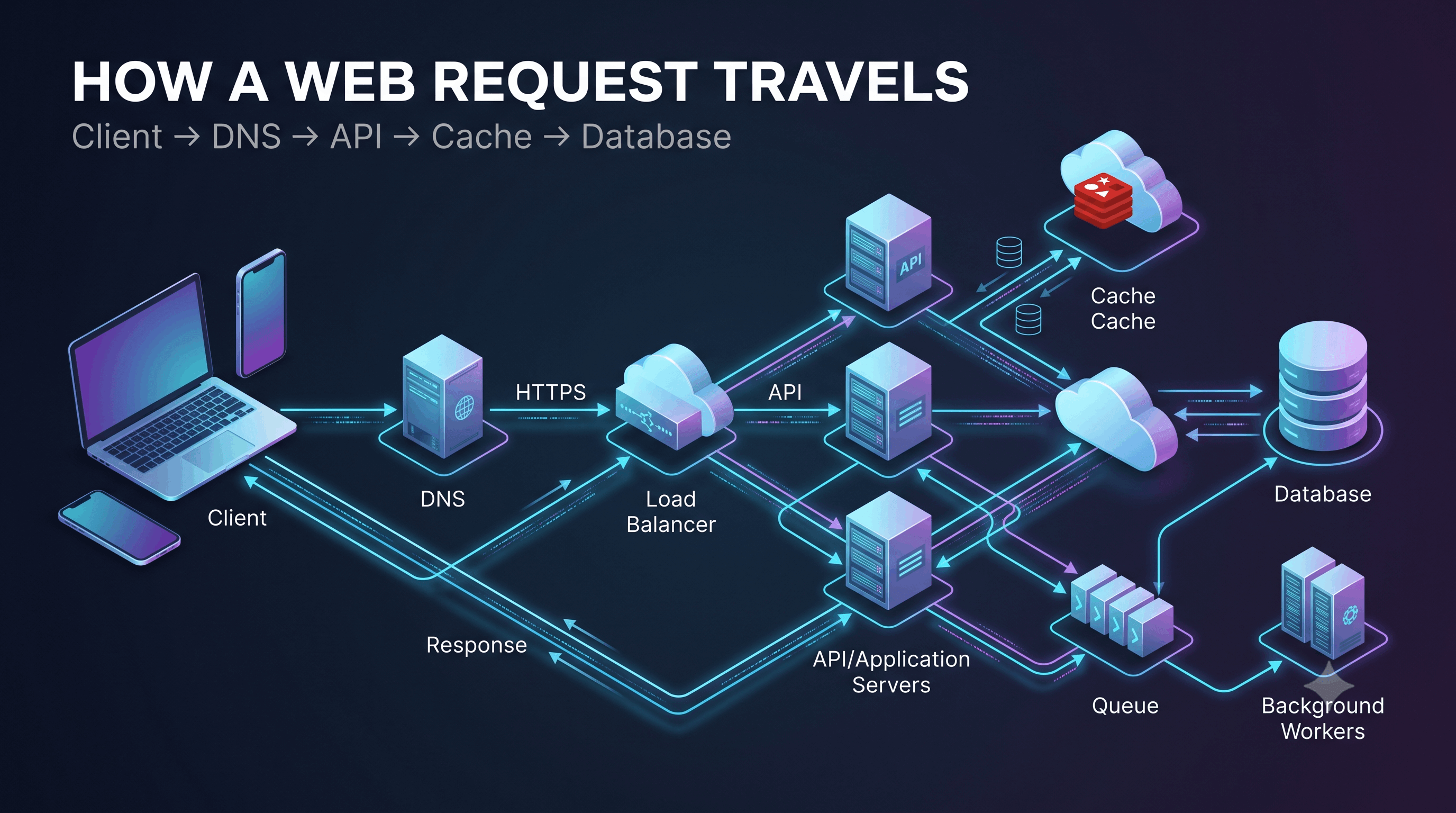
A simplified architecture:
                    +----------------+
                    |      Redis     |
                    |     Cache      |
                    +----------------+
                         ↑       ↓
                         |       |
User → Load Balancer → Application
                         |
                         v
                    +-----------+
                    | Database  |
                    +-----------+
Redis stores data primarily in memory, making it well suited for fast lookups.
Suppose an e-commerce application has:
GET /products/500Without caching:
Client
  |
  v
API Server
  |
  v
Database
  |
  v
Product
With Redis:
Client
  |
  v
API Server
  |
  v
Redis
  |
  +---- HIT ----> Product
  |
  +---- MISS
          |
          v
      Database
          |
          v
        Redis
          |
          v
       Product
If the product is requested thousands of times, most requests may never reach the database.
One of the hardest parts of caching is keeping cached data synchronized with the source of truth.
Imagine:
Database:

Product price = ₹999
Cache:
Product price = ₹999Now the product price changes:
Database:

Product price = ₹799
But the cache still contains:
₹999Users may receive incorrect information.
This is the classic cache invalidation problem.
A common approach is:
Update Database
      |
      v
Delete/Update Cache
For example:
UPDATE products
SET price = 799

DELETE product:500 FROM CACHE
The next request will miss the cache and retrieve the latest value.
There are several approaches.
When data changes:
Database updated
      ↓
Cache deleted
The next read repopulates the cache.
This is often simple and reliable.
Instead of deleting:
Database updated
      ↓
Cache updated
Now both layers contain the new value.
Allow cached data to become stale for a limited amount of time.
For example:
TTL = 60 secondsThis reduces the amount of invalidation logic but introduces a window where stale data can be served.
There is a famous engineering observation:
There are only a few truly difficult things in computer science, and cache invalidation is one of them.
The reason is simple.
Once data exists in multiple places, keeping those copies synchronized becomes a distributed systems problem.
Imagine a very popular page.
Millions of users request:
homepageThe cached value expires.
Suddenly:
Cache MISS
Cache MISS
Cache MISS
Cache MISS
Cache MISS
...
Thousands of application servers simultaneously query the database.
The database gets overwhelmed.
This is called a:
Cache Stampede
or
Thundering Herd
Several techniques can help.
Only one request rebuilds the cache.
Request A → Cache MISS → gets lock → Database

Request B → Cache MISS → waits

Request C → Cache MISS → waits
After A populates the cache:
Cache populated

B → Cache
C → CacheInstead of allowing thousands of keys to expire at exactly the same time, expiration times can be slightly randomized.
For example:
Base TTL = 300 seconds

Actual TTL:
302
315
307
324
309
This spreads database load over time.
The system refreshes popular cache entries before they expire.
Cache
  |
  | nearing expiration
  v
Background Worker
  |
  v
Database
  |
  v
Updated Cache
This can be particularly useful for highly popular data.
Another problem occurs when users repeatedly request data that doesn't exist.
For example:
GET /users/999999999The database has no such user.
The application doesn't cache the result.
An attacker or poorly designed client repeatedly requests the same nonexistent ID.
Every request becomes:
Cache MISS
     ↓
Database
     ↓
NOT FOUND
The database gets hammered.
This is called cache penetration.
One strategy is to temporarily cache negative results.
For example:
user:999999999 = NOT_FOUND

TTL = 60 seconds
Another strategy is to validate IDs before querying the database.
Bloom filters can also be used in large systems to quickly determine whether a requested key is likely to exist.
Imagine thousands of cache entries all expire around the same time.
10:00

Cache
├── Product A → expired
├── Product B → expired
├── Product C → expired
├── Product D → expired
└── Product E → expired
Suddenly, a huge number of requests reach the database.
This is called a cache avalanche.
Solutions include:
Sometimes one particular key receives an enormous number of requests.
For example:
homepageor:
product:iphone-xyzSuppose:
10 million requestsall hit the same cache key.
Even though the database is protected, the cache itself may become a bottleneck.
This is called a hot key problem.
Possible solutions include:
Caching can happen at different layers.
Each application server has its own memory cache.
             Application 1
             +----------+
             |  Cache   |
             +----------+

Users → Load Balancer

             +----------+
             |  Cache   |
             +----------+
             Application 2
Advantages:
Disadvantages:
A shared cache is used by multiple application servers.
                 +---------+
                 |  Redis  |
                 +---------+
                  ↑   ↑   ↑
                  |   |   |
               App1 App2 App3
Advantages:
Disadvantages:
Large systems may use more than one cache.
For example:
User
 |
 v
CDN
 |
 v
Application
 |
 v
Local Cache
 |
 v
Redis
 |
 v
Database
Each layer has a different purpose.
Useful for globally distributed content.
Extremely fast application-level data.
Shared distributed cache.
Source of truth.
This layered approach can significantly reduce database traffic.
Consider an application:
GET /users/123A possible architecture:
                   ┌─────────────┐
                   │    Client   │
                   └──────┬──────┘
                          │
                          v
                   ┌─────────────┐
                   │Load Balancer│
                   └──────┬──────┘
                          │
                          v
                   ┌─────────────┐
                   │ API Server  │
                   └──────┬──────┘
                          │
                   ┌──────v──────┐
                   │    Redis   │
                   └──────┬──────┘
                          │
                       Cache Miss
                          │
                          v
                   ┌─────────────┐
                   │  Database   │
                   └─────────────┘
The API server doesn't necessarily need to query the database for every request.
Caching introduces a fundamental trade-off:
Freshness vs PerformanceIf you cache data for a long time:
Performance ↑
Freshness   ↓
If you aggressively invalidate data:
Freshness   ↑
Complexity  ↑
Database Load ↑
System designers need to understand how stale the application can tolerate being.
For a social media follower count, a few seconds of staleness may be acceptable.
For a bank balance, stale data can be dangerous.
Therefore:
Cache according to business requirements, not simply because caching is available.
Good candidates include:
Poor candidates include:
When designing a system, ask:
Identify:
Database queries
External APIs
Complex calculations
Expensive aggregationsLook for:
Popular products
Popular posts
User profiles
Trending content
ConfigurationDefine:
1 second?
1 minute?
1 hour?
Never?For many applications:
Cache-Aside + TTLis a strong starting point.
Ask:
When does this data change?
Who invalidates the cache?
What happens if invalidation fails?What happens if Redis goes down?
A robust application should usually degrade gracefully:
Redis unavailable
       ↓
Application
       ↓
Database
The system may become slower, but it shouldn't necessarily become completely unavailable.
Suppose we are designing a social media news feed.
Users frequently request:
GET /feedGenerating the feed may require:
Doing all of this for every request could be expensive.
We could cache the result:
User 123 Feed
      |
      v
Redis
      |
      +---- HIT → Return feed
      |
      +---- MISS
              |
              v
          Feed Service
              |
              v
          Database
              |
              v
            Redis
But now we have another question:
What happens when a user creates a new post?
We need an invalidation or update strategy.
This demonstrates why caching isn't simply:
Put Redis in front of database.The real challenge is deciding what to cache, when to cache it, and when to invalidate it.
A mature system might look like:
                         Users
                           |
                           v
                         CDN
                           |
                           v
                    Load Balancers
                           |
              +------------+------------+
              |            |            |
              v            v            v
            App 1        App 2        App 3
              |            |            |
              +------------+------------+
                           |
                           v
                    Distributed Cache
                         Redis
                           |
                    Cache Miss Only
                           |
                           v
                        Database
                           |
                           v
                    Read Replicas
Notice something important:
The database still exists.
Caching does not replace the database.
The database generally remains the source of truth.
The cache is an optimization layer.
More cache doesn't automatically mean a better system.
Permanent cached data can become stale.
If the underlying data changes, the cache needs a strategy.
A single cache can become a critical point of failure.
Always consider:
What happens if Redis is unavailable?Different data has different freshness requirements.
One extremely popular key can create unexpected bottlenecks.
A mechanism for temporarily storing frequently accessed data closer to the application to reduce latency and backend load.
When requested data is found in the cache.
When requested data isn't found in the cache and must be retrieved elsewhere.
The application checks the cache first and retrieves data from the database on a miss.
Time To Live — the duration for which cached data remains valid.
Least Recently Used — an eviction policy that removes data that hasn't been accessed recently.
A situation where many requests simultaneously attempt to regenerate expired cache data, potentially overwhelming the backend.
The application should have a fallback strategy, often retrieving data from the database while protecting the database from a sudden traffic spike.
Possible approaches include:
When data changes extremely frequently, has strict freshness requirements, or has a low reuse rate that doesn't justify the caching complexity.
Remember this flow:
Request
   |
   v
Cache?
   |
   +---- HIT ----> Return
   |
   +---- MISS
          |
          v
       Database
          |
          v
       Cache
          |
          v
       Return
Remember these concepts:
Cache Hit
Cache Miss
Cache-Aside
Read-Through
Write-Through
Write-Back
Write-Around
TTL
LRU
LFU
Cache Invalidation
Cache Stampede
Cache Penetration
Cache Avalanche
Hot Keys
Local Cache
Distributed Cache
And most importantly:
Caching = Performance + Scalability
           +
ComplexityCaching is one of the most powerful tools available to a system designer.
It can:
But caching also introduces new problems:
A strong system designer doesn't simply say:
"Let's add Redis."
A strong system designer asks:
"What data should we cache, why should we cache it, how long should it live, how will it be invalidated, and what happens when the cache fails?"
That mindset is what turns caching from a technology choice into a system design decision.
Pixels to Perfection Design that Impresses