Rahul
 LeetCode #155: Min Stack — Design a Stack with O(1) Minimum Retrieval
 LeetCode #20: Valid Parentheses — Master the Stack Pattern
 LeetCode #15: 3Sum — Master Sorting, Two Pointers and Duplicate Handling
 Instruction vs Context in AI Prompts: How to Tell AI What to Do and What Information to Use
 Rust Structs and Enums: Building Powerful Data Models
 Dissecting the High-Level System Architecture of Booking.com
 Kanban vs. Scrum: Which Agile Methodology to Choose?
 The Scaling Journey of LinkedIn: From Startup to Professional Powerhouse
 Mastering Code Review: A Guide for Reviewers and PR Creators
 ChatGPT: Unveiling the Power of AI in Conversational Experiences with Kairos Coders

Kairos Coders are here to help
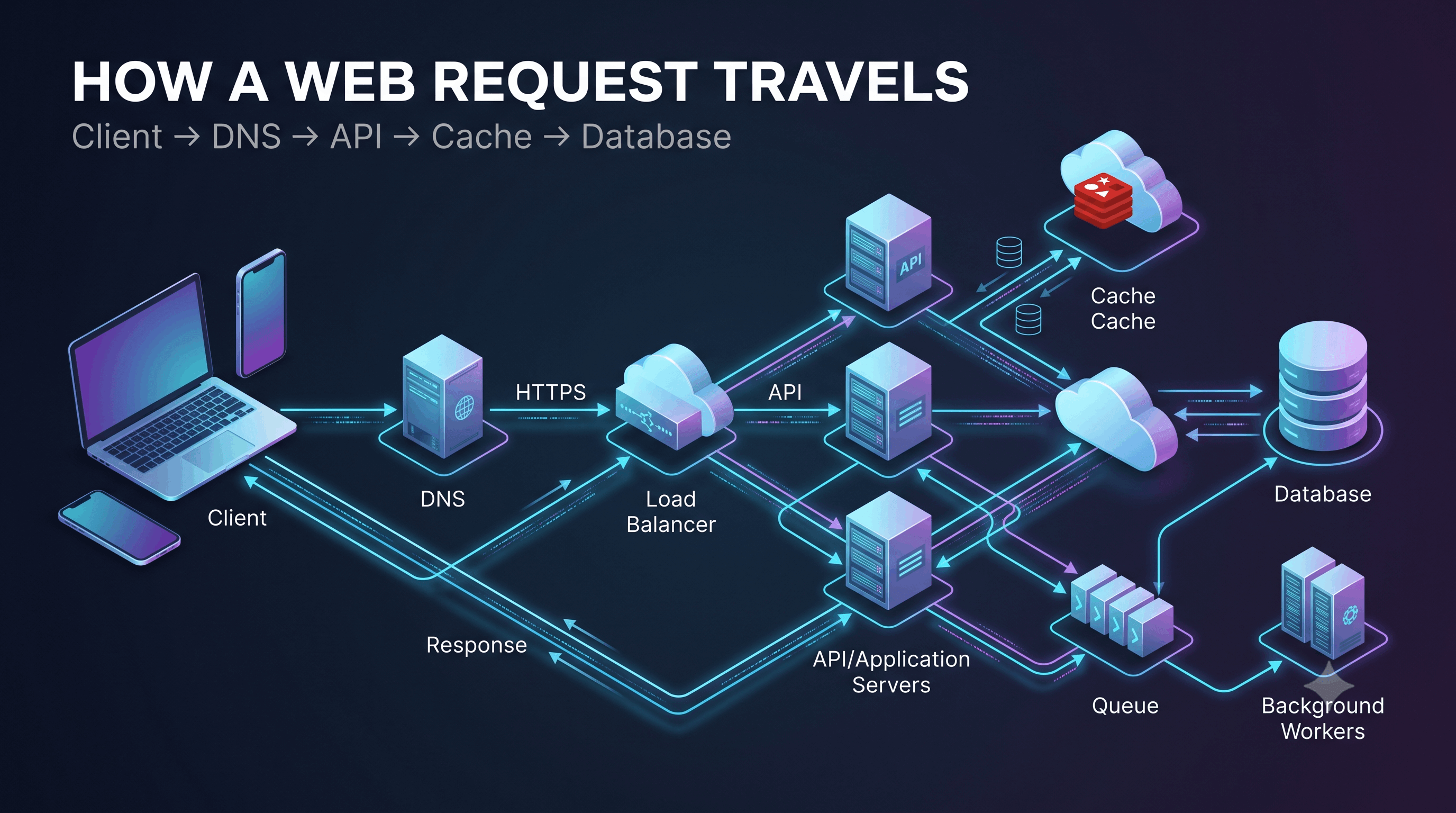
Every time you open a website, search for something, log into an application, upload a photo, or place an order, a surprisingly large number of things happen behind the scenes.
You might think:
“I clicked a button, so the server gave me a response.”
But a modern application can involve:
Browser
   ↓
DNS
   ↓
Internet
   ↓
Load Balancer
   ↓
Web/API Server
   ↓
Cache
   ↓
Database
   ↓
Response
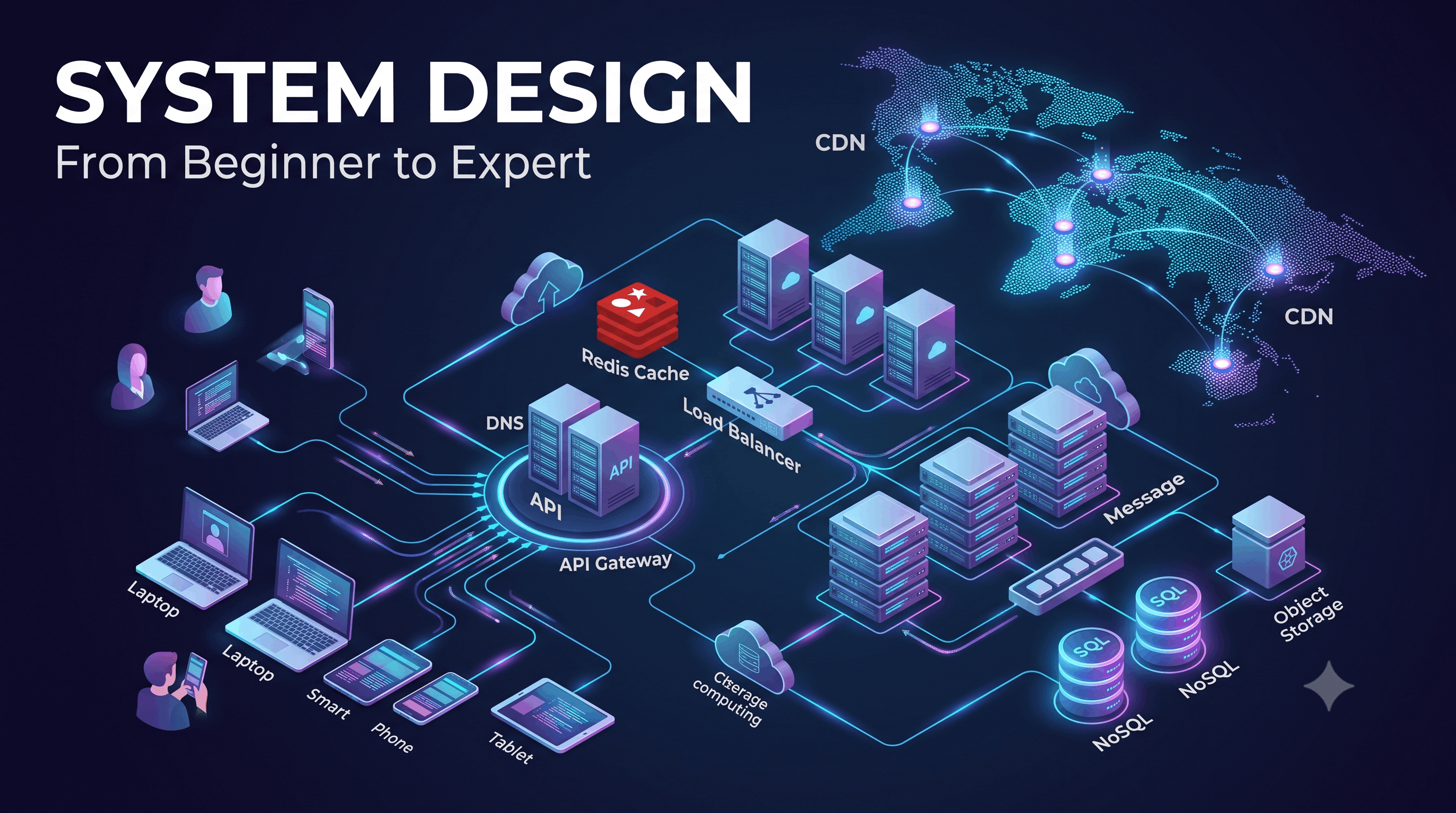
Understanding this request flow is one of the most important foundations of System Design.
Before learning about distributed systems, sharding, Kafka, microservices, or Kubernetes, you should understand how a basic client-server application works.
Client-server architecture is a model where responsibilities are divided between:
The client requests something.
The server processes the request and returns a response.
A simple example:
Client
  │
  │ Request
  ▼
Server
  │
  │ Response
  ▼
Client
The client could be:
The server could be:
Imagine you open:
https://example.com/productsYour browser doesn't magically know where example.com lives.
Several steps happen before you see the products.
A simplified flow is:
Browser
   ↓
DNS
   ↓
Server IP
   ↓
TCP/TLS Connection
   ↓
HTTP Request
   ↓
Server
   ↓
Application
   ↓
Database
   ↓
HTTP Response
   ↓
Browser
Let's understand each stage.
You type:
https://example.com/productsinto your browser.
The browser needs to find the server responsible for that domain.
This is where DNS comes in.
DNS stands for:
Domain Name System
Humans prefer names:
example.comComputers communicate using IP addresses:
93.184.216.34DNS translates the domain name into an IP address.
Conceptually:
example.com
     ↓
    DNS
     ↓
93.184.216.34
Without DNS, users would need to remember IP addresses for every website.
A common beginner assumption is:
Domain → IPIn reality, DNS resolution can involve multiple layers of caching and different DNS servers.
A simplified hierarchy is:
Browser Cache
      ↓
Operating System Cache
      ↓
DNS Resolver
      ↓
Root DNS
      ↓
TLD DNS
      ↓
Authoritative DNS
      ↓
IP Address
Fortunately, most of the time cached information allows the process to be much faster.
Once the client knows the server's IP address, it needs to communicate with it.
For a typical HTTPS connection, the process involves networking protocols such as TCP and TLS.
At a high level:
Client
  ↓
TCP Connection
  ↓
TLS Security
  ↓
HTTPS
TLS provides encryption and helps protect data exchanged between the client and server.
This is why modern websites generally use:
https://instead of:
http://Now the browser can send an HTTP request.
A simplified request might look like:
GET /products HTTP/1.1
Host: example.com
The request can contain:
Common HTTP methods include:
GET
POST
PUT
PATCH
DELETEUsed to retrieve data.
GET /productsExample:
Give me the list of products.
Used to create or submit something.
POST /ordersExample:
Create this order.
Usually used to replace/update a resource.
PUT /users/123Used for a partial update.
PATCH /users/123Example:
Change only the user's phone number.
Used to delete a resource.
DELETE /users/123API stands for:
Application Programming Interface
An API provides a structured way for software components to communicate.
For example:
Mobile App
     ↓
GET /api/products
     ↓
Backend API
     ↓
Database
The mobile application doesn't need to know how the database works.
It simply communicates through the API contract.
One of the most common API styles is REST.
A REST API might expose:
GET    /users
GET    /users/123
POST   /users
PATCH  /users/123
DELETE /users/123
For example:
GET /api/products/42The server might respond:
{
  "id": 42,
  "name": "Laptop",
  "price": 79999
}
The frontend doesn't need to know whether the backend uses PostgreSQL, MySQL, MongoDB, or something else.
It only needs to understand the API contract.
In a simple application:
Client
  ↓
Application Server
But in a larger architecture, clients may communicate through an API Gateway.
                    ┌── User Service
                    │
Client → API Gateway ├── Order Service
                    │
                    ├── Payment Service
                    │
                    └── Product Service
The API Gateway can handle responsibilities such as:
This becomes particularly useful in microservice architectures.
Imagine your application becomes popular.
One server is no longer enough.
You add:
Server 1
Server 2
Server 3
But who decides which server receives each request?
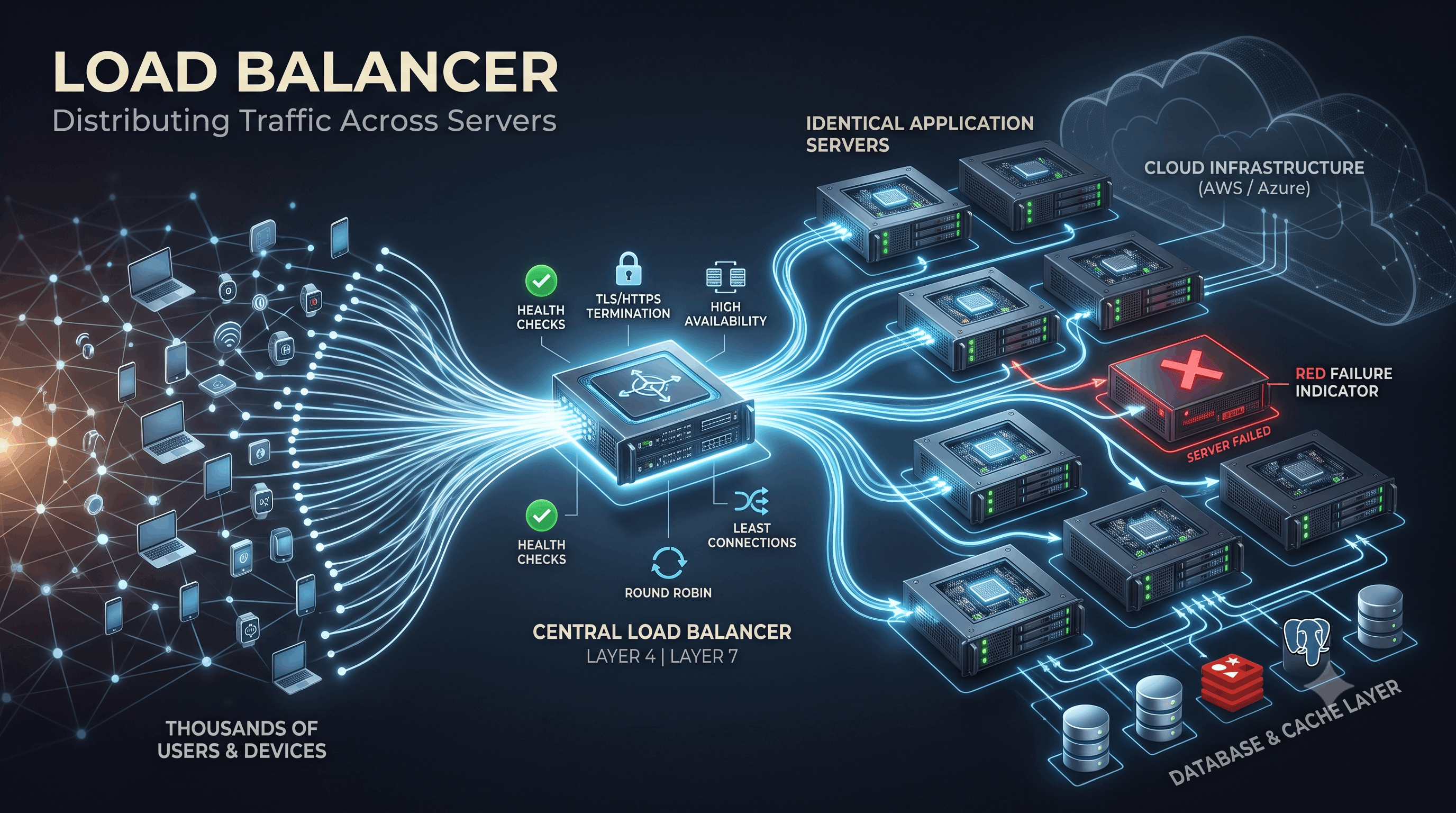
The load balancer.
                  ┌── Server 1
                  │
Client → Load Balancer ── Server 2
                  │
                  └── Server 3
Instead of sending every request to one server, traffic is distributed among multiple servers.
Suppose one server can handle:
1,000 requests/secondYour application receives:
3,000 requests/secondA single server won't be sufficient.
With three servers:
3 × 1,000
=
3,000 requests/second
In an idealized scenario, you have enough capacity.
Real systems are more complicated because workloads aren't always evenly distributed, but the fundamental idea remains.
Load balancers can distribute requests using different strategies.
Requests are distributed sequentially:
Request 1 → Server A
Request 2 → Server B
Request 3 → Server C
Request 4 → Server ASend traffic to the server with the fewest active connections.
More powerful servers receive more traffic.
For example:
Server A → 50%
Server B → 30%
Server C → 20%
The appropriate strategy depends on the workload.
The request now reaches an application server.
Suppose the user requests:
GET /productsThe application might:
Conceptually:
Request
   ↓
Application Logic
   ↓
Data Access
   ↓
ResponseSuppose the application needs product information.
It may query the database:
SELECT * FROM products;The database returns the data.
Application Server
       ↓
     Query
       ↓
   Database
       ↓
    Results
The application then constructs the API response.
Now imagine thousands of users request the same product.
Without caching:
10,000 requests
      ↓
10,000 database queries
This can put unnecessary pressure on the database.
With a cache:
10,000 requests
      ↓
    Cache
      ↓
Most requests served here
      ↓
Only some requests reach DB
For example:
User
 ↓
API
 ↓
Redis
 ↓
Database
This can dramatically reduce database workload for suitable access patterns.
When an application checks the cache, there are two common outcomes.
The requested data exists.
Request
  ↓
Cache
  ↓
Data Found ✓
The application can return the cached data.
The data isn't available.
Request
  ↓
Cache
  ↓
Not Found
  ↓
Database
  ↓
Store Result in Cache
  ↓
Response
This basic pattern is called cache-aside or lazy loading.
We will explore caching deeply later in this series.
Once the server finishes processing the request, it sends a response.
For example:
HTTP/1.1 200 OK
Content-Type: application/json
with:
{
  "products": [
    {
      "id": 1,
      "name": "Laptop"
    },
    {
      "id": 2,
      "name": "Keyboard"
    }
  ]
}
The client receives the response.
Status codes communicate what happened.
200 OK
201 Created
204 No Content301 Moved Permanently
302 Found
304 Not Modified400 Bad Request
401 Unauthorized
403 Forbidden
404 Not Found
429 Too Many Requests500 Internal Server Error
502 Bad Gateway
503 Service Unavailable
504 Gateway TimeoutUnderstanding these codes is important when debugging distributed systems.
Let's put everything together.
Suppose a user requests:
https://shop.example.com/products/42A simplified architecture could look like:
                 ┌──────────────┐
                 │     DNS      │
                 └──────┬───────┘
                        │
                        ▼
                    Internet
                        │
                        ▼
                ┌───────────────┐
                │ Load Balancer │
                └───────┬───────┘
                        │
              ┌─────────┴─────────┐
              ▼                   ▼
        Application 1       Application 2
              │                   │
              └─────────┬─────────┘
                        ▼
                    ┌───────┐
                    │ Cache │
                    └───┬───┘
                        │
                    Cache Miss
                        │
                        ▼
                   ┌─────────┐
                   │Database │
                   └─────────┘
The response travels back to the client.
System Design becomes interesting when we stop assuming everything works perfectly.
Consider this architecture:
Client
  ↓
Load Balancer
  ↓
Application
  ↓
Database
What happens if the database crashes?
Client
  ↓
Load Balancer
  ↓
Application
  ↓
Database ❌
Your application may become unusable.
What if the application server crashes?
Application 1 ❌
Application 2 ✓
A load balancer can potentially route traffic to the healthy server.
This demonstrates an important principle:
A system should be designed with failure in mind.
A Single Point of Failure (SPOF) is a component whose failure can bring down the entire system.
Consider:
Users
  ↓
Single Server
  ↓
Database
If the server fails:
Application ❌Instead, we can introduce redundancy:
             ┌── Server 1
Users → LB ──┤
             └── Server 2
Now one application server can fail without necessarily taking down the entire service.
But redundancy itself isn't enough.
What if the load balancer is a single point of failure?
Users
  ↓
Single Load Balancer ❌
  ↓
Servers
Now the load balancer becomes the bottleneck and failure point.
This is why System Design requires us to examine the entire architecture, not just individual components.
Suppose you have:
Server A
Server B
Server C
A user logs in through Server A.
If Server A stores all session information only in its own memory, the next request going to Server B could cause problems.
One solution is to keep shared state outside the application servers.
For example:
Server A ──┐
Server B ──┼── Redis
Server C ──┘
Now all application servers can access the same session state.
This makes horizontal scaling easier.
The server maintains client-specific state locally.
User
 ↓
Server A
 ↓
Local SessionThe server doesn't rely on locally stored session state.
User
 ↓
Server A
 ↓
Shared State Store
or the request carries enough information for the server to process it independently.
Stateless architecture is often easier to scale horizontally.
Imagine:
1,000 usersYour architecture works perfectly.
Then:
100,000 usersNow problems appear.
The database becomes overloaded.
You add caching.
Then:
1,000,000 usersNow application servers need to scale.
You add more servers.
Then:
10,000,000 usersYou may need:
This is the fundamental journey of System Design:
Simple Architecture
        ↓
Growing Traffic
        ↓
Bottlenecks
        ↓
Optimization
        ↓
Scaling
        ↓
Distributed ArchitectureThese concepts are often confused.
How quickly can the system complete a task?
Example:
Request latency = 50 msHow well does the system handle increasing workload?
Example:
1,000 requests/sec
        ↓
10,000 requests/sec
        ↓
100,000 requests/sec
A system can be very fast for a small workload but difficult to scale.
Likewise, a highly scalable system might sacrifice some latency for greater throughput.
System Design is about balancing these requirements.
Let's apply everything we've learned.
Imagine an e-commerce platform.
A simplified architecture might be:
                    Users
                      │
                      ▼
                     DNS
                      │
                      ▼
                     CDN
                      │
                      ▼
               Load Balancer
                      │
          ┌───────────┼───────────┐
          ▼           ▼           ▼
      API Server   API Server   API Server
          │           │           │
          └───────────┼───────────┘
                      │
          ┌───────────┼────────────┐
          ▼           ▼            ▼
        Cache      Database     Queue
                                  │
                                  ▼
                               Workers
Different components solve different problems.
| Component | Primary Purpose |
|---|---|
| DNS | Domain resolution |
| CDN | Deliver cached content closer to users |
| Load Balancer | Distribute traffic |
| API Servers | Business logic |
| Cache | Fast data access |
| Database | Persistent data |
| Queue | Asynchronous processing |
| Workers | Background jobs |
A major System Design mistake is architecture by buzzword.
Someone might draw:
Kubernetes
Kafka
Redis
MongoDB
PostgreSQL
Elasticsearch
Microservices
CDN
GraphQL
and call it a scalable architecture.
But architecture isn't a shopping list.
Every component should solve a specific problem.
For example:
Why do we need Redis?
Possible answer:
Because product data is frequently read and caching it reduces database load and latency.
That's a meaningful architectural decision.
But:
“Because Redis is used in large companies.”
is not a design reason.
When designing a system, repeatedly ask:
What problem am I solving?
For example:
Problem: Too many requests hitting one server.
Solution: Horizontal scaling + load balancing.
Problem: Database reads are too expensive.
Solution: Caching, query optimization, replicas, or other appropriate techniques.
Problem: Long-running background work makes APIs slow.
Solution: Asynchronous processing with queues and workers.
Problem: Large static files create latency and origin load.
Solution: CDN and object storage.
This problem → solution mindset is much more valuable than memorizing technologies.
In a System Design interview, you may receive a question like:
“Design a URL shortener.”
Don't immediately draw:
Redis
Kafka
MongoDB
Kubernetes
Instead, start by asking questions.
Then estimate scale.
Then design the simplest architecture that satisfies the requirements.
Then identify bottlenecks.
Then improve the design.
That is how strong System Design interviews are approached.
Throughout this series, we'll use a consistent methodology.
Understand what the system needs to do.
Estimate:
Determine how clients interact with the system.
Determine what information must be stored.
Identify major components.
Ask:
What will break first?
Introduce appropriate solutions.
Ask:
What happens when something fails?
Explain why one approach was selected over another.
A modern web request is not simply:
Browser → ServerIt can look more like:
Client
  ↓
DNS
  ↓
Internet
  ↓
Load Balancer
  ↓
API/Application Servers
  ↓
Cache
  ↓
Database
  ↓
Queue/Workers
  ↓
Response
Each component exists because it solves a particular problem.
The most important lesson isn't memorizing this diagram.
It is learning to ask:
What problem does this component solve?
As applications grow, new problems appear:
More users
    ↓
More traffic
    ↓
More data
    ↓
More failures
    ↓
More complexity
System Design is the discipline of managing that complexity while keeping the system scalable, reliable, performant, and maintainable.
Pixels to Perfection Design that Impresses