Rahul
 LeetCode #155: Min Stack — Design a Stack with O(1) Minimum Retrieval
 LeetCode #20: Valid Parentheses — Master the Stack Pattern
 LeetCode #15: 3Sum — Master Sorting, Two Pointers and Duplicate Handling
 Instruction vs Context in AI Prompts: How to Tell AI What to Do and What Information to Use
 Rust Structs and Enums: Building Powerful Data Models
 Dissecting the High-Level System Architecture of Booking.com
 Kanban vs. Scrum: Which Agile Methodology to Choose?
 The Scaling Journey of LinkedIn: From Startup to Professional Powerhouse
 Mastering Code Review: A Guide for Reviewers and PR Creators
 ChatGPT: Unveiling the Power of AI in Conversational Experiences with Kairos Coders

Kairos Coders are here to help
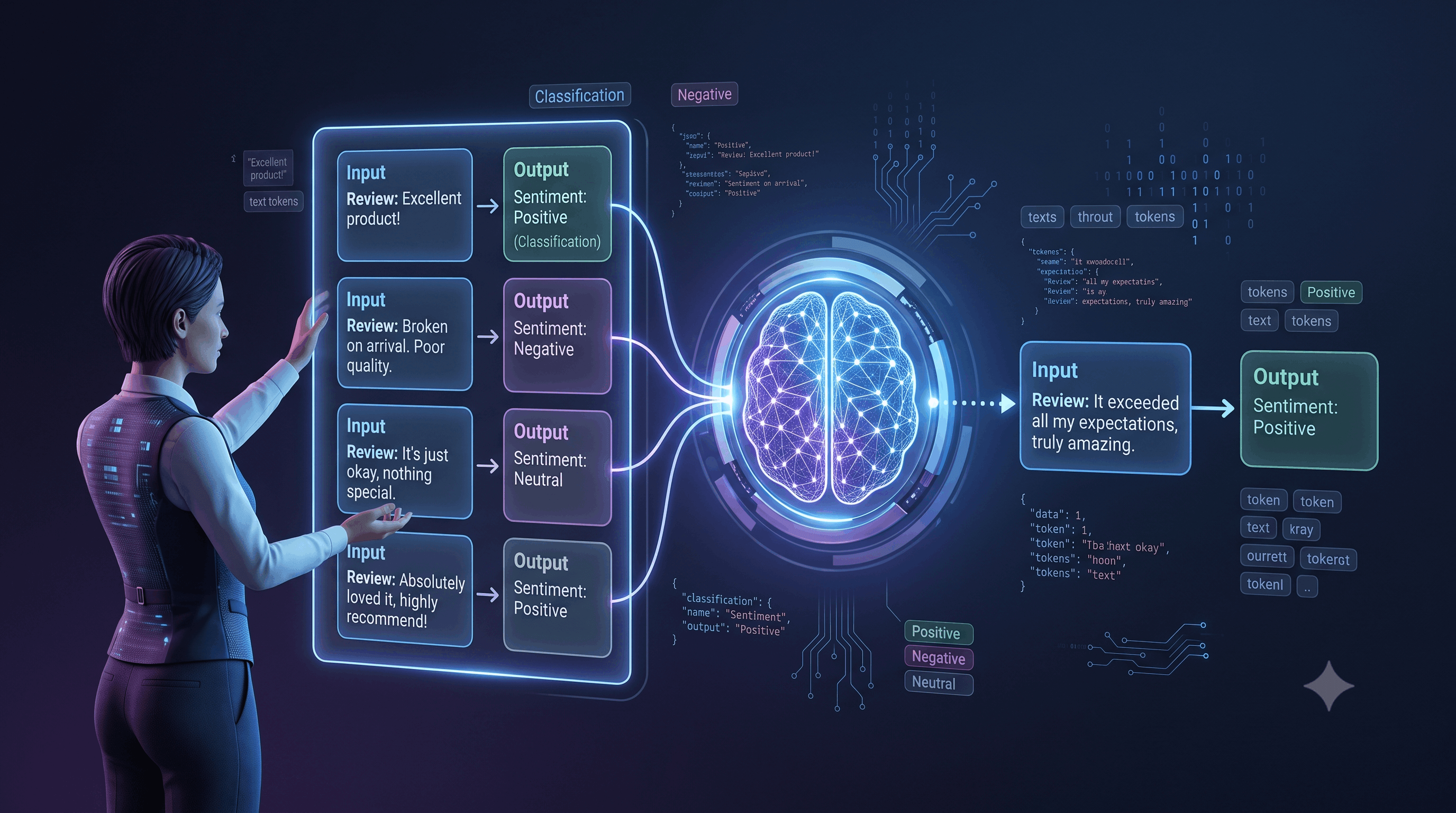
What if you could teach an AI model exactly how you want a task performed without training the model yourself?
You can.
One of the most powerful prompt engineering techniques for doing this is few-shot prompting.
Instead of simply telling an AI what to do, you provide a small number of examples showing:
Input → Expected Output
The model can then identify the pattern and apply it to new inputs.
For example:
Review: "The product is fantastic."
Sentiment: Positive

Review: "The delivery was terrible."
Sentiment: Negative

Review: "The product is okay."
Sentiment: Neutral

Review: "I absolutely love this product."
Sentiment:
The expected answer is:
PositiveNo model retraining was required.
No custom machine-learning pipeline was required.
The examples inside the prompt demonstrated the behavior.
This is the fundamental idea behind few-shot prompting.
Few-shot prompting is a prompt engineering technique where one or more examples are provided to an AI model to demonstrate how a task should be performed.
The examples act as demonstrations.
A general structure looks like this:
Instruction

Example 1:
Input → Output

Example 2:
Input → Output

Example 3:
Input → Output

New Input:
Input → ?
The model uses the demonstrations to infer the desired pattern.
The terminology comes from the number of examples provided.
0 examples1 exampleA small number of examplesThere is no universal number that defines "few."
Depending on the task, you might provide:
The important concept is that the examples are provided inside the prompt, rather than changing the model's underlying parameters through training.
This distinction is extremely important.
Suppose you provide:
Example:
"Awesome product!" → Positive
You have not retrained the model.
You have simply given it information within the current context.
Conceptually:
Pretrained LLM
     +
Examples in Prompt
     ↓
Task-specific behavior
     ↓
Generated Output
This is sometimes described as in-context learning.
The model adapts its behavior based on the examples available in the current context.
Let's compare the two approaches.
Classify the following reviews as Positive,
Negative, or Neutral.

Review:
"The product arrived late."
No examples are provided.
Review:
"The product was excellent."
Label: Positive

Review:
"The product was terrible."
Label: Negative

Review:
"The product was okay."
Label: Neutral

Review:
"The product arrived late."
Label:
The examples establish the classification pattern.
Natural language instructions can sometimes be ambiguous.
Suppose you tell an AI:
"Convert these sentences into a professional tone."
What does "professional" mean?
It could mean:
Instead, show an example.
Input:
"Hey, send me the report ASAP."

Output:
"Please send me the report at your earliest convenience."
Now the model has a concrete demonstration of the transformation you want.
This is one of the biggest advantages of few-shot prompting.
Imagine you're building a system that converts informal messages into professional messages.
You could provide:
Input:
"Can you send the file?"

Output:
"Could you please send the file when you have a moment?"

Input:
"Need this fixed today."

Output:
"Could you please prioritize resolving this issue today?"

Input:
"Hey, let's talk tomorrow."

Output:
?
The model can infer that the task is to transform casual communication into polite, professional language.
Possible output:
"Would you be available to discuss this tomorrow?"The examples demonstrate the desired transformation.
Classification is one of the most common applications.
Suppose an e-commerce company receives customer messages.
You want to classify them into:
A few-shot prompt might look like:
Message:
"I was charged twice for my order."

Category:
Billing

Message:
"Where is my package?"

Category:
Shipping

Message:
"I cannot log into my account."

Category:
Account

Message:
"The headphones stopped working."

Category:
Product

Message:
"The website keeps showing an error."

Category:
Technical Support

Message:
"My card was charged but my order wasn't created."

Category:
The model can infer:
BillingThe examples provide concrete boundaries between categories.
Suppose you want to classify customer reviews.
Review:
"I absolutely love this product!"

Sentiment:
Positive

Review:
"Worst purchase I've ever made."

Sentiment:
Negative

Review:
"It works as expected."

Sentiment:
Neutral

Review:
"The quality is good, but shipping was extremely slow."

Sentiment:
The examples establish the desired classification behavior.
The model might classify the final review as:
Negativeor potentially another category depending on your exact classification rules.
This highlights an important lesson:
Examples don't eliminate ambiguity unless the examples themselves clearly define the task.
Few-shot prompting can also demonstrate how information should be extracted.
Suppose you want to extract product information from text.
Input:
"I bought an iPhone 15 for ₹65,000."

Output:
{
  "product": "iPhone 15",
  "price": 65000
}

Input:
"I purchased a MacBook Air for ₹95,000."

Output:
{
  "product": "MacBook Air",
  "price": 95000
}

Input:
"I ordered a Samsung Galaxy S25 for ₹72,000."

Output:
The model can infer the expected extraction pattern.
Expected:
{
  "product": "Samsung Galaxy S25",
  "price": 72000
}
This is especially useful when the desired output structure is not obvious from the task description alone.
Developers can also use examples to demonstrate coding conventions.
For example:
Input:
Calculate the square of a number.

Output:
def square(n: int) -> int:
    return n * n
Then:
Input:
Calculate the cube of a number.

Output:
The model may infer that you want:
def cube(n: int) -> int:
    return n * n * n
Few-shot examples can help communicate:
Suppose your application needs a specific JSON structure.
Instead of simply saying:
"Return JSON."
provide examples.
Input:
Rahul is 30 years old and lives in India.

Output:
{
  "name": "Rahul",
  "age": 30,
  "country": "India"
}

Input:
Sarah is 27 years old and lives in Canada.

Output:
{
  "name": "Sarah",
  "age": 27,
  "country": "Canada"
}

Input:
John is 35 years old and lives in Australia.

Output:
Expected:
{
  "name": "John",
  "age": 35,
  "country": "Australia"
}
The examples communicate the exact structure.
For production systems, however, use schema validation or structured-output capabilities where available instead of relying solely on prompt formatting instructions.
Few-shot prompting has a major weakness:
Bad examples can teach the wrong behavior.
Consider:
Input:
"The product is excellent."

Output:
Negative
If you're trying to build a sentiment classifier, this example teaches the model something incorrect.
The model isn't necessarily going to know that your example is wrong.
It may follow the demonstrated pattern.
Therefore:
Your examples are part of your prompt's specification.
Treat them carefully.
Don't randomly select examples.
Choose examples that represent the task well.
For example, for customer-support classification, you might want examples covering:
Suppose your category is "Refund."
Don't provide only:
"I want a refund."
Also consider:
"I accidentally purchased the wrong plan."
"I was charged after canceling my subscription."
"Can I get my money back?"
Different wording helps demonstrate the concept.
Imagine you're teaching an AI to recognize SQL injection attempts.
If every example looks like:
' OR 1=1 --the model may learn superficial patterns.
More useful examples would cover different forms and contexts.
The general principle is:
Examples should represent the underlying task, not merely repeat the same surface pattern.
It might seem logical that:
More examples = Better results.
But that's not always true.
More examples consume context.
They can also introduce:
Suppose five carefully selected examples produce excellent results.
Adding 100 random examples may make the prompt unnecessarily large.
The goal is:
Maximum useful signal with minimum unnecessary context.
The arrangement of examples can sometimes influence the model's behavior.
For example:
Example 1
Example 2
Example 3
New Input
may behave differently from another ordering when examples contain subtle patterns.
This is especially relevant when examples have:
For production systems, test different example sets and ordering rather than assuming one arrangement is optimal.
One powerful strategy is to choose examples that are similar to the current task.
Suppose the user asks:
"My payment was reversed."
If your examples include:
"I was charged twice." → Billing
"I forgot my password." → Account
"My package is late." → Shipping
the billing example is likely more relevant than the others.
This leads to a more advanced technique:
Dynamic few-shot prompting.
Instead of always sending the same examples, the application retrieves the most relevant examples for each user request.
A system can work like this:
User Request
     ↓
Find Similar Examples
     ↓
Select Best Examples
     ↓
Build Prompt
     ↓
LLM
     ↓
Output
For example:
User:
"My subscription was charged after I canceled it."

        ↓

Retrieve similar examples:

"Charged twice" → Billing
"Charged after cancellation" → Billing
"Can't log in" → Account

        ↓

Construct prompt

        ↓

LLM

        ↓

Billing
This can be much more efficient than including every possible example in every request.
Imagine you are building a chatbot.
Users might say:
"I want to cancel my subscription."
or:
"How do I stop my plan?"
or:
"Please terminate my membership."
All three may represent the same intent.
Examples can teach the model that different expressions map to the same underlying category.
"I want to cancel my subscription."
Intent: CANCEL_SUBSCRIPTION

"How do I stop my plan?"
Intent: CANCEL_SUBSCRIPTION

"Please terminate my membership."
Intent: CANCEL_SUBSCRIPTION
Now:
"I don't want this plan anymore."
can potentially be classified as:
CANCEL_SUBSCRIPTIONFew-shot prompting isn't limited to classification.
It can teach writing style.
Suppose you want concise technical explanations.
Example:
Input:
What is an API?

Output:
An API is a way for two software systems to communicate.
Think of it like a waiter taking your request to a kitchen.
Then:
Input:
What is a database?

Output:
The model may produce a similarly concise explanation with an analogy.
This is useful for:
Another common application is transforming text.
For example:
Input:
"hey can u send me the invoice"

Output:
"Could you please send me the invoice?"

Input:
"need the report asap"

Output:
"Could you please send me the report as soon as possible?"

Input:
"can we reschedule the meeting?"

Output:
The model can infer the transformation pattern.
A robust few-shot prompt can look like:
Task:
Classify customer messages.

Categories:
- Billing
- Account
- Shipping
- Technical Support

Instructions:
Identify the customer's primary issue.
Return exactly one category.

Examples:

Message:
"I was charged twice."

Category:
Billing

Message:
"I forgot my password."

Category:
Account

Message:
"Where is my package?"

Category:
Shipping

Message:
"The app crashes when I open it."

Category:
Technical Support

New message:
{{customer_message}}

Return only the category.
This structure separates:
That separation makes the prompt easier to understand and maintain.
These techniques are often confused.
You provide examples at inference time.
Prompt
+
Examples
→
Model
You don't modify the model's parameters.
You train or adapt a model using a dataset.
Conceptually:
Training Dataset
       ↓
Model Training
       ↓
Updated Model
       ↓
Inference
Fine-tuning is a fundamentally different process.
Few-shot prompting is often much faster to experiment with because you can change the examples without training a model.
Few-shot prompting is particularly useful when:
An example can be clearer than several paragraphs of instructions.
Examples can demonstrate exactly what you want.
Examples can show how categories differ.
Examples can demonstrate voice and tone.
Examples can improve task alignment.
You may not need it when:
Always test whether examples actually improve your application.
Use an experimental workflow:
Start with Zero-Shot
        ↓
Measure Performance
        ↓
Identify Failure Cases
        ↓
Add Representative Examples
        ↓
Test Again
        ↓
Remove Unnecessary Examples
        ↓
Evaluate on New Data
This is much more effective than adding examples randomly.
If you're developing a production AI system, don't evaluate a prompt using only one or two examples.
Create a test set containing:
For example:
Test Case 1 → Expected: Billing
Test Case 2 → Expected: Shipping
Test Case 3 → Expected: Account
Test Case 4 → Expected: Technical Support
...
Then compare different prompt versions.
This turns prompt engineering into an engineering process rather than guesswork.
Suppose you have two prompt versions.
Uses three examples.
Uses eight examples.
Run both against the same evaluation dataset.
Measure:
Then choose based on evidence.
This is how prompt engineering becomes more scientific.
Imagine Kairos Coders is building an AI assistant that categorizes customer requests.
Possible categories:
Sales
Support
Billing
Partnership
Other
A few-shot prompt could contain:
Customer:
"I want to know the pricing for your enterprise plan."

Category:
Sales

Customer:
"My website is showing a 500 error."

Category:
Support

Customer:
"I was charged twice this month."

Category:
Billing

Customer:
"We want to collaborate with your company."

Category:
Partnership

Customer:
"I'd like to discuss your enterprise pricing."

Category:
Expected:
SalesNotice how the examples establish the difference between categories.
In a real application, few-shot prompting might be part of a larger architecture:
             User Request
                   ↓
            Intent Detection
                   ↓
          Retrieve Examples
                   ↓
          Build Prompt
                   ↓
                LLM
                   ↓
          Validate Output
                   ↓
            Application
This is increasingly common in production AI systems.
Incorrect or misleading examples teach incorrect behavior.
Large prompts can increase cost and complexity.
Examples unrelated to the actual task may add noise.
If every example uses a different structure, the model may struggle to infer the intended pattern.
If your examples imply a rule that isn't explained, the model may infer the wrong generalization.
A prompt that looks good on three examples may fail badly on real-world data.
Remember this:
Don't use examples just because you can. Use examples because they teach something the instructions don't communicate clearly enough.
A great example is worth more than ten mediocre examples.
The progression looks like this:
ZERO-SHOT

Instruction
     ↓
LLM
     ↓
Output
Then:
FEW-SHOT

Instruction
     +
Examples
     ↓
LLM
     ↓
Output
The examples provide additional information about the task.
Few-shot prompting allows you to guide an AI model using demonstrations rather than relying entirely on textual instructions.
The most important lessons are:
Few-shot prompting is one of the most practical techniques in modern prompt engineering.
Instead of explaining every rule in a long instruction, you can often show the AI what you mean.
The basic pattern is simple:
Instruction
+
Examples
+
New Input
=
Desired Behavior
But the real skill lies in choosing high-quality, representative examples.
Start with zero-shot prompting.
If the model struggles, identify why.
If the problem is unclear behavior, add examples.
Then test different example sets and measure the results.
And this brings us to an even more important question:
Pixels to Perfection Design that Impresses